 Call Technician

Samsung AC Error Codes & Troubleshooting Guide [India]
Samsung split and window ACs use built-in error codes to flag problems the moment something goes wrong. These codes appear on the indoor unit’s display, backed by a specific LED blink pattern, so users can spot the exact fault fast.
Some codes point to genuine faults, like sensor or motor errors, while others reflect the AC protecting itself from issues like blocked refrigerant flow or low gas.
This guide covers error codes for both Samsung split and window AC models. It is based on official Samsung user manuals and written specifically for Indian users dealing with everyday AC problems at home.

Samsung AC Error Code Finder
Type your error code below to see what it means and the quick fix to try.
TL;DR
Quick Find Your Samsung AC Error Codes
| Error Codes & Meaning | Quick Solutions |
|---|---|
| E101 – Communication error between indoor and outdoor units | Check the wiring between both units. Confirm the power and communication cables are not crossed. |
| E121 – Indoor temperature sensor error | Check the sensor's connector for a loose or faulty fit. |
| E122 / E123 – Indoor heat exchanger sensor error | Check the sensor's connector for a loose or faulty fit. |
| E154 – Indoor fan motor error | Check the motor's connector. Remove any object blocking the fan. |
| E162 / E163 – EEPROM or option error (display and all LEDs blink) | Reset the AC's options. Contact a technician if the error repeats. |
| E422 – Refrigerant flow blocking error | Check if the stop valve is fully open. Inspect the refrigerant pipe for blockages or leaks. |
| E554 – Lack of refrigerant (inverter models only) | Get refrigerant levels checked. Ask a technician to inspect for leaks at the valve and pipe connection. |
Note: E554 only appears when the fault is on the outdoor unit. Always note down the exact code shown on your display and share it with your Samsung service provider for the fastest, most accurate diagnosis.
Hire Our Expert AC Technician for Same Day Home Service in Kolkata
Samsung AC Error Code Explanation With Possible Solutions

E101 – Communication Error Between Indoor and Outdoor Units
What Causes This Error:
This error appears when the indoor unit cannot exchange signals with the outdoor unit properly. It usually happens due to a crossed, loose, or damaged power or communication cable between the two units. Rat-damaged wiring or a poor connection at the terminal block can also trigger this fault.
How to Fix The Error:
- Turn off the AC and check the connecting wire between the indoor and outdoor units.
- Confirm the power cable and communication cable are not crossed or swapped.
- Look for loose, burnt, or chewed wiring at both ends.
- If wiring looks fine, get a technician to test the communication voltage with a multimeter.
E121 – Indoor Room Temperature Sensor Error
What Causes This Error:
This code points to a fault in the sensor that reads room temperature. A loose sensor connector, a damaged sensor wire, or a failed sensor itself can all set off this error.
How to Fix The Error:
- Check the sensor's connector to confirm it is properly plugged in.
- Look for any visible wire damage near the sensor.
- If the connection looks fine, the sensor may need replacement by a technician.
Urban Service Plaza is the best Samsung AC Service Centre in Kolkata for expired warranty products. Hire our technicians for same day appliance repair at your doorstep.
E122 / E123 – Indoor Heat Exchanger (Evaporator) Temperature Sensor Error
What Causes This Error:
These codes indicate a problem with the sensor that monitors the evaporator coil's temperature. A loose connector or a faulty sensor are the most common reasons behind this error.
How to Fix The Error:
- Check the connection of the heat exchanger sensor connector.
- Ensure the sensor sits properly against the coil.
- Replace the sensor if the error continues after checking the connection.
E154 – Indoor Fan Motor Error
What Causes This Error:
This error shows up when the indoor fan motor is not working correctly. It can be caused by a loose motor connector or by a foreign object physically blocking the fan from spinning.
How to Fix The Error:
- Check the fan motor's connector for a loose fit.
- Open the indoor unit and remove any object restraining the fan blades.
- Call a technician if the fan still doesn't spin after clearing the blockage.
E162 / E163 – EEPROM / Option Setting Error
What Causes This Error:
This error relates to the AC's memory chip (EEPROM), which stores its option settings. It often appears after a firmware glitch, incorrect option configuration, or a memory chip fault. The display and all LEDs blink together when this occurs.
How to Fix The Error:
- Re-set the AC's options through the installer or service menu.
- Turn the AC off from the main power, wait a few minutes, then restart it.
- Contact a technician if the error returns, as the EEPROM chip itself may need replacement.
E422 – Refrigerant Flow Blocking Error
What Causes This Error:
This code appears when refrigerant cannot flow properly between the indoor and outdoor units. Common causes include a partially closed stop valve, a blockage inside the refrigerant pipe, or a refrigerant leak.
How to Fix The Error:
- Check that the stop valve is completely open.
- Inspect the refrigerant pipe connecting both units for any blockage.
- Check for refrigerant leaks at pipe joints and valve connections.
- Contact a technician for leak repair and pipe clearing, as refrigerant work needs specialized tools.
E554 – Refrigerant Shortage (Inverter Models Only)
What Causes This Error:
This error means the AC does not have enough refrigerant gas to run properly. It typically results from a leak at the valve or pipe connection, or from insufficient gas charged for a longer pipe run during installation.
How to Fix The Error:
- Check whether enough refrigerant was charged for the pipe length, as per piping codes and standards.
- Inspect the valve and pipe connection points for leaks.
- Get a technician to test refrigerant pressure and recharge the correct gas type and quantity.
- Note: This LED pattern appears only when the fault originates on the outdoor unit.
Troubleshoot for Most Common Samsung AC Problems

The Air Conditioner Does Not Work at All
Possible Causes:
- No power reaching the indoor unit due to a tripped circuit breaker or disconnected power cord.
- The isolator switch is turned off.
- The Timed Off function is active, which shuts down the unit at a scheduled time.
What to Do:
- Check the power supply status, then try operating the air conditioner again.
- Switch on the circuit breaker, plug in the power cord, and operate the air conditioner again.
- Make sure the isolator switch is turned on.
- Check whether the Timed Off function is active. If so, press the Power button to operate the air conditioner again.
I Cannot Change the Temperature
Possible Causes:
- The AC is running in Fan or Fast mode, which controls the set temperature automatically and blocks manual adjustment.
What to Do:
- Check whether the Fan or Fast mode is running. In these modes, the air conditioner automatically controls the set temperature, so you cannot change it manually.
- Switch to Cool, Heat, or Auto mode if you want manual control over the temperature.
Cool or Warm Air Does Not Come Out of the Air Conditioner
Possible Causes:
- The set temperature is higher than the room temperature in Cool mode, or lower than room temperature in Heat mode.
- A dirty or blocked air filter is restricting airflow, or the outdoor unit is covered or obstructed.
- The unit is running its defrost function, or the compressor has a short protective pause after startup.
- Open doors or windows are letting cool or warm air escape, or the refrigerant pipe exceeds the recommended length.
What to Do:
- Adjust the set temperature using the remote so it is lower than room temperature in Cool mode (or higher in Heat mode).
- Clean the air filter regularly to restore airflow and cooling or heating performance.
- Remove any obstructions blocking the outdoor unit.
- Wait out the defrost cycle in winter. This is normal: the indoor fan stops and warm air pauses briefly while ice clears from the outdoor coil.
- Close doors and windows to prevent conditioned air from escaping.
- Allow a few minutes for the fan to resume after startup, since this protects the outdoor compressor.
- Check with a technician if the refrigerant pipe run is unusually long, as this can reduce performance.
I Cannot Change the Air Flow Direction
Possible Causes:
- The Good Sleep function is active, which locks the airflow direction automatically (except in Heat mode).
What to Do:
- Check whether the Good Sleep function is running. During this mode, you cannot control the airflow direction, except in Heat mode where adjustment is still possible.
- Turn off Good Sleep mode if you need manual airflow control.
I Cannot Change the Fan Speed
Possible Causes:
- Auto, Dry, or Fast mode is running, or Good Sleep mode is active in Cool mode. All of these modes control fan speed automatically.
What to Do:
- Check whether Auto, Dry, or Fast mode is running, or whether Good Sleep mode is active in Cool mode.
- Switch to a mode that allows manual fan speed control if needed.
The Remote Control Does Not Work
Possible Causes:
- Weak or dead batteries in the remote.
- An object blocking the signal path between the remote and indoor unit.
- Interference from strong lighting sources like fluorescent lamps or neon signs near the indoor unit.
What to Do:
- Replace the batteries in the remote control with new ones.
- Make sure there are no objects blocking the signal between the remote control and the indoor unit.
- Check for strong lighting sources near the indoor unit, as they may interfere with the remote signal.
- If the remote still doesn't respond, test it using a phone camera: point the remote at the camera and press a button. If no light flashes, the remote or its battery is likely faulty.
The Timed On/Off Function Does Not Work
Possible Causes:
- The SET button was not pressed after setting the timer on the remote.
What to Do:
- Make sure you pressed the SET button on the remote control after setting the timer.
- Re-enter the timer settings and confirm with SET again if the function still fails.
The Indicator Blinks Continuously
Possible Causes:
- A communication or unit fault that keeps the indicator in an active-warning state.
What to Do:
- Turn off the air conditioner using the Power button, or disconnect the power supply.
- If the indicator continues blinking after restarting, contact the service centre for further diagnosis.
Odours Are Present in the Room During Operation
Possible Causes:
- The AC is operating in a smoky or polluted environment.
- The drain system is dirty or clogged, allowing odour buildup.
What to Do:
- Ventilate the room and run the fan mode for 3 to 4 hours. The air conditioner itself does not contain components that produce strong odours.
- Check whether the drain system is dirty or clogged, and clean it regularly.
An Error Is Indicated
Possible Causes:
- The indoor unit has detected a fault, such as a sensor, communication, or refrigerant issue, and is showing this through a blinking indicator and error code.
What to Do:
- If the indoor unit indicator is blinking, contact the nearest service centre and provide the displayed error code.
- Refer to the error code table in this guide for a quick idea of the likely cause before calling for service.
Noise Is Generated
Possible Causes:
- Refrigerant flow changes inside the unit during normal operation.
What to Do:
- No action is needed. Refrigerant flow may create noise during operation, and this is a normal operating condition.
Smoke Is Generated From the Outdoor Unit
Possible Causes:
- The unit is running its defrost function in Heat mode during winter, which produces steam rather than smoke.
What to Do:
- No action is needed in most cases. This is usually steam, not smoke, and is normal during winter defrost cycles.
- Contact a technician immediately if you notice a burning smell or visible flames, as this indicates a genuine electrical fault rather than normal steam.
Water Drips From the Pipe Connections of the Outdoor Unit
Possible Causes:
- Condensation forming due to a significant change in ambient temperature.
What to Do:
- No action is needed in most cases. This is a normal occurrence and does not indicate a fault.
- Get the unit checked if dripping is excessive or continues for several days without a clear temperature change.
When to Call Samsung Service Centre for Technician Visit?
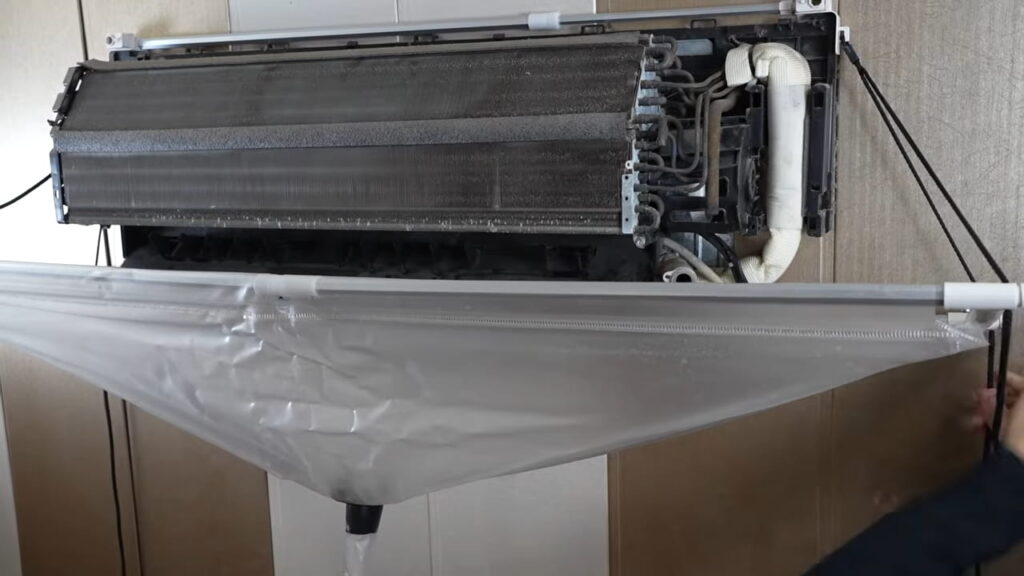
Some AC problems are simple and can be fixed at home. Others need a trained technician with the right tools and parts. Here are the top problems that call for professional help.
Samsung AC error codes make troubleshooting quick and simple. A quick check of the code often reveals the real problem before you call for help. Basic issues like loose wiring or dirty filters you can fix yourself. Others, like refrigerant leaks or PCB faults, need a trained technician.
When in doubt, note the code and contact Samsung's service centre for safe, lasting repairs.
![Gree AC Error Codes & Troubleshooting Guide [Error Finder Tool]](https://urbanserviceplaza.co.in/wp-content/uploads/2026/07/gree-ac-error-codes-1-768x432.png)


